
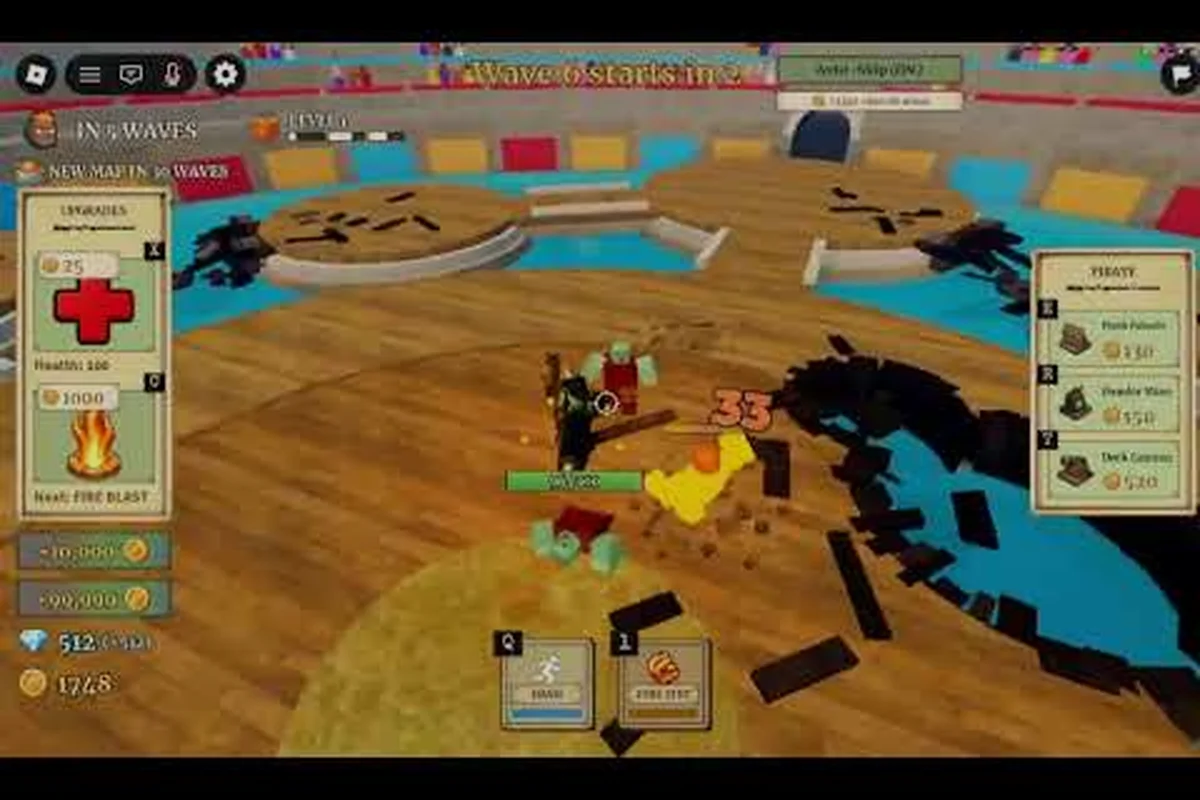
Jumping into a new Roblox wave survival game can feel chaotic, but a focused fruit zombie survival beginner guide helps you skip the trial-and-error phase. The game drops you into endless zombie hordes where Devil Fruits define your build, Berries fund your upgrades, and boss waves every few rounds punish anyone who ignores positioning. Since the Fruit Zombie Survival official Roblox page confirms the game is free with up to 4-player co-op and an 80 percent positive rating across 1.74 million visits, you'll want to arrive prepared instead of learning the hard way in Wave 1.
This starting guide walks you through your first hour in the game, from choosing your first fruit loadout to surviving the Dune Marauder boss on Wave 10, so you can build confidence before tackling harder content. You'll find practical tips for beginners, key control shortcuts, farming loops, and the exact upgrades that matter most in the early game.
Understanding the Fruit Zombie Survival Core Loop
Before chasing any specific build, you need a clear picture of what the game actually asks you to do between waves. Each match follows a tight rhythm: clear zombies, collect Berries, buy upgrades, and brace for boss waves that scale in difficulty. The official listing highlights 20 collectible Devil Fruits, each granting a themed ability that replaces or augments your basic attack, and a co-op mode that lets up to four friends share the same lobby with global leaderboards.
The core loop breaks into four repeating actions:
-
Clear zombies with melee attacks and fruit abilities to earn Berries
-
Spend Berries in the UPGRADES menu between waves
-
Open new Devil Fruits to swap or upgrade your active ability
-
Survive boss waves that arrive every few rounds, each with unique attack patterns
Players who understand this rhythm early tend to snowball faster because they plan upgrades around boss timers instead of reacting to them. The wave countdown between rounds is your single most valuable window, and beginners who treat it as shopping time rather than waiting time consistently outpace those who skip the menu entirely.
What the HUD Tells You
The interface looks simple, but every icon carries useful information. The top-left health bar tracks your survivability, the top-right corner holds the Auto-Skip toggle that lets the game auto-complete easier waves, and the left-side UPGRADES menu opens during the countdown. Your current wave, Berry count, and any active buffs sit along the bottom bar, with the ability cooldown indicator showing when your fruit power is ready to fire.
Why Devil Fruits Matter More Than Weapons
Beginners often assume weapons carry the game, but in this title the Devil Fruit ability is your primary damage and crowd-control tool. Weapons supplement your basic attack but cannot match the area-of-effect output of a well-timed fruit ability. The official game page describes the fruit system as the core progression pillar, and community testing on the diamond-farming route confirms that Fire Fist spam alone sustains roughly 19,000 diamonds per hour.
Your First Match: Setup and Controls
The earliest decisions you make shape your entire run, so treat the first match as a learning environment rather than a push for high scores. Drop into a solo lobby first, set the party size to 1, and toggle Auto-Skip in the top-right corner so the game can handle routine waves while you focus on positioning and ability timing.
Key Bindings to Memorize
| Control | Key | Purpose |
|---|---|---|
| Basic Attack | Mouse 1 | Melee swing, low cooldown |
| Fire Fist / Fruit Ability | V | Primary Devil Fruit power |
| Dash | Q | Quick repositioning dodge |
| Interact / Buy Upgrade | E | Opens the UPGRADES menu during countdown |
| Auto-Skip Toggle | Top-Right Button | Lets the game auto-clear easy waves |
Dash is the most underused control among new players, and it's also the most important. A well-timed Q lets you escape zombie encirclements and reposition around boss telegraphs. Combine it with your V-key ability to chain safe damage windows without overcommitting.
Early Game Upgrade Priority
When the first countdown hits, you'll face a familiar beginner trap: spending Berries on cosmetic bonuses or stat spreads that don't move the needle. Health is the single most reliable early investment because every boss encounter tests your survivability first and your damage second. A second priority is ability cooldown reduction, since shorter cooldowns let you spam Fire Fist more often and clear dense hordes faster.
| Priority | Upgrade | Why It Matters |
|---|---|---|
| 1 | Health | Extends survival through boss damage spikes |
| 2 | Ability Cooldown | More Fire Fist casts per wave |
| 3 | Melee Damage | Helps between ability casts |
| 4 | Movement Speed | Late-game pick after core stats are solid |
The diamond-farming route documented by community guides confirms that buying the Health upgrade during wave countdowns is the single highest-ROI action a beginner can take in the first 10 waves. After you clear the Dune Marauder on Wave 10, you can reset and repeat the loop without losing meaningful progress.
The First Ten Waves: What to Expect
The first 10 waves function as the game's tutorial-in-disguise. Zombies are slow, spawns are predictable, and the only boss you face is the Dune Marauder, a sand-themed enemy with a telegraphed slam and a projectile volley. Most beginners who die before Wave 10 die because they stop moving, which is exactly the opposite of what the game rewards.
The Farming Loop New Players Should Learn First
Once you understand the basic rhythm, the fastest way to convert early progress into steady resources is the Corrida Colosseum solo loop. Set the party size to 1, enable Auto-Skip, and spam Fire Fist with the V key whenever the cooldown ends. Buy the Health upgrade during each countdown, and reset your character the moment the Dune Marauder falls on Wave 10.
This loop is attractive for beginners because it delivers roughly 320 diamonds per run in about a minute, which compounds into a serious resource base if you can sustain 19,000 diamonds per hour. The All Things How guide documents this exact rotation, and players who follow it report smoother transitions into harder content because they enter later runs with both upgrade levels and confidence.
Common Beginner Mistakes on Wave 1-5
The first five waves feel easy, and that comfort is exactly where most beginners develop bad habits. The most common error is standing still while attacking, which lets zombies stack on top of you and chip away at the health bar you haven't upgraded yet. The second error is wasting Berries on cosmetic or stat-spread upgrades instead of stacking Health early. A third mistake is ignoring the Q dash, which leaves you with no escape tool when a zombie pack flanks you from behind.
| Mistake | What Happens | Better Choice |
|---|---|---|
| Standing still to attack | Zombie encirclement and chip damage | Move between casts, reposition after every ability |
| Spending on cosmetic upgrades | Wasted Berries, no survivability gain | Stack Health first, then cooldown reduction |
| Ignoring the Dash key | No escape from boss telegraphs | Bind Dash to muscle memory early |
| Skipping the UPGRADES menu | Falling behind in damage curve | Buy something every countdown, even a small upgrade |
Reading the table above and applying one fix per run will compound into a noticeable improvement by Wave 10. Players who commit to the loop usually clear the first boss on their third or fourth attempt, which is normal for the learning curve.
Beginner Build Choices and First Devil Fruits
With 20 Devil Fruits in the game, picking a first fruit can feel overwhelming. The beginner-friendly options share a few traits: short cooldowns, wide area-of-effect damage, and simple aim requirements. Once you identify a fruit that matches your playstyle, you can specialize instead of constantly switching loadouts.
Top Starter Fruits for New Players
| Devil Fruit | Strength | Beginner Fit |
|---|---|---|
| Fire Fist | Wide cone damage, short cooldown | Best for solo farming loops |
| Smoke | Crowd control and repositioning | Good for players who struggle with positioning |
| Rumble | Long-range burst, harder aim | Solid pick once you learn the timing |
| Spring | Mobility-focused | Fun but weaker early game |
Fire Fist is the standout recommendation because of how well it synergizes with the Corrida Colosseum farming loop. The V-key spam pattern means you don't have to think about aiming, and the wide cone covers most zombie spawns without requiring you to reposition constantly. Once you're comfortable with the rhythm, Rumble rewards better aim with higher burst damage, while Smoke is the safest choice for players who get cornered often.
When to Switch Fruits in Your First Hours
A common beginner question is whether to switch fruits after each one levels up, or commit to a single fruit and stack it. Early on, commit to a single fruit so you can learn its timing and range without confusing your muscle memory. Once you reach Wave 20 and have stable Health and cooldown upgrades, experiment with secondary fruits to round out your build for harder boss waves. The detailed Fruit Zombie Survival weapon guide covers how weapons pair with fruit abilities, which becomes relevant once you have a stable fruit pick.
Co-op, Parties, and When to Group Up
While solo play is the fastest way to farm resources, the game's co-op mode for up to 4 friends adds a different kind of value. Boss waves become much more manageable with a coordinated team, and the global leaderboards give you a reason to push for higher scores once your build is stable. The official game page confirms co-op as a headline feature, and the community hub on Discord shares build coordination tips for new players who want to group up.
How to Set Up a Party
Setting up a co-op run is straightforward, but beginners often miss the option because it's tucked into the lobby menu. Open the game page, hit the Party button, and invite friends from your Roblox friends list before starting the match. Once you're in a lobby of 2 to 4 players, the wave scaling adjusts and the boss HP pool grows proportionally, but so do your rewards and revive options.
| Party Size | Boss Difficulty | Reward Scaling | Best Use Case |
|---|---|---|---|
| 1 (Solo) | Standard | Baseline | Farming loops, learning mechanics |
| 2 | Slightly harder | Higher Berry payout | Testing builds with a friend |
| 3 | Noticeably harder | Strong payout | Coordinated boss strategies |
| 4 | Hardest | Best loot | Late-game leaderboard runs |
The full breakdown of party setup, voice coordination, and role assignment lives in the Fruit Zombie Survival co-op guide. Solo players who plan to transition to co-op later should still practice boss patterns alone first, since group runs punish players who haven't internalized the timing windows.
Beginner Pitfalls That End Runs Before Wave 10
Even with a solid starting plan, the first few runs always surface a few surprises. Most of these pitfalls are easy to fix once you recognize them, and avoiding them separates a struggling beginner from a player who clears Wave 20 on their first day. The official game page lists 1.74 million visits and a strong positive rating, which means most players do figure things out — but the ones who progress fastest are the ones who learn from structured tips instead of brute force.
The Five Pitfalls That Slow New Players Down
-
Neglecting Health upgrades: The single most common mistake. New players chase damage and die before they can use it. Health stacking first solves more problems than any other stat choice.
-
Wasting Berries on cosmetics early: Cosmetics are tempting, but they don't help you clear Wave 10. Save them for late-game runs when your build is stable.
-
Ignoring Auto-Skip: Auto-Skip saves time on waves you've already mastered. Beginners who don't toggle it spend 20 minutes per farming session on content they could clear in 10.
-
Standing in the zombie path during boss telegraphs: Bosses always telegraph big attacks. If you're standing where they aim, you take the hit. Learn the wind-ups.
-
Switching fruits every match: Constant swaps prevent you from learning any single ability. Commit to one fruit for at least 10 runs before experimenting.
Working through this list one item at a time will move you from "dying on Wave 5" to "comfortably clearing Wave 20" faster than any other single change. Once these foundations are stable, the broader Fruit Zombie Survival noob to pro guide covers the next layer of progression choices that take you from beginner to intermediate territory.
Frequently Asked Questions
How long does it take to clear Wave 10 as a beginner?
Most beginners reach the Dune Marauder boss between 8 and 12 minutes on their first few runs, and clear it within 3 to 5 attempts once they learn the dodge timing. Practice the Corrida Colosseum loop, stack Health early, and spam Fire Fist when the V key cooldown ends.
Are there any working codes for Fruit Zombie Survival?
According to Pro Game Guides, the developer has not yet launched a codes system, so there are no working codes at this time. The official Discord is the community hub for announcements, and new codes will be shared there first if a system is added.
Can I play Fruit Zombie Survival with friends?
Yes, the game supports up to 4-player co-op. Open the lobby menu, set the party size, and invite friends from your Roblox friends list before starting the match. The co-op setup guide walks through the full process if you want a step-by-step walkthrough.
Which Devil Fruit is the best for beginners?
Fire Fist is the most beginner-friendly fruit because of its wide cone, short cooldown, and simple aim. It pairs perfectly with the solo farming loop and lets new players focus on positioning and upgrade timing instead of precision aiming.
Is Fruit Zombie Survival free to play?
Yes, the game is free to play on Roblox. You can jump into matches immediately, and the in-game store offers cosmetic purchases but does not gate core progression behind a paywall, which makes it accessible for new players who want to learn the full game.